Is Webflow better than WordPress? A detailed comparative analysis

When it comes to choosing the right tool and platform for brand new website design, things might seem confusing to you, especially if you are new to website designing.

You will find a myriad of technical information. Not all of them will be necessary. Also, depending on how you want your website to be, a lot of things will change.

There is not a shred of doubt that Webflow and WordPress are the two most preferred platforms for website building and designing. Both of the platforms come with their fair share of strengths and weaknesses.

If you can choose the right platform now, it will reduce a lot of problems in the future. Thus, in this blog, we shall present you all the details on Webflow and WordPress, and then you can decide for yourself.

SL NO.

Webflow

WordPress

1

Founded in

2012 2003
2

Templates

Responsive templates available according to the industry (both paid and free) A wide collection of paid and free themes available
3

Technical Support

Webflow University, email, live chat, video tutorials, forum No official customer care support
4

Blogging options

Integrated blogging Built-in blogging
5

Design Freedom

Start within an empty canvas and customize every element visually. If you are not a coder, you shall need a visual design plugin or you will be restricted with available templates.
6

Code quality

Webflow brings code that is clean and semantic Codes are bloated due to the reliance of plugins
7

SEO

Completely customizable SEO settings, easy to set up. Webflow sites are built for modern internet. Easily to customize if you are using a plugin, also you have to know how to configure the plugin.
8

Website security

Free SSL on all sites along with consistent threat monitoring Offers free SSL sites, but WordPress sites do have their fair share of vulnerabilities if not maintained properly.
9

User-friendliness

Very minimal on-page editing, convenient dashboard UI Lots of irrelevant options on the dashboard and lacks on-page editing.
10

Collaboration

Easy to collaborate design and content, client billing is built right in Good built-in editorial collaboration but doesn’t have native billing support.

What is a Webflow website builder?

Webflow is a cloud-based website builder that will help anyone in building a nice website. For Webflow, we literally mean ANYONE! The best part is, you don’t need any coding skills at all.

Unlike any other website-building platforms, like Wix and Squarespace, Webflow is highly customizable and a robust tool. This is something you can only get by using Javascript and HTML CSS.

Since it is so customizable, Webflow has become very popular among web designers. Also, it is suitable for anyone and everyone who is looking to create a completely customizable website without any hassle of hiring designers or developers.

The key features of Webflow

  • Drag & drop page builder
  • Works directly with the CMS data
  • Intuitive editor
  • Webflow is extremely SEO friendly
  • e-commerce site
  • Works with reusable CSS classes
  • Responsive page designs
  • Works with Flexbox
  • Option to publish to the website right away
  • Define global color swatches
  • SSL & ISO 27018
  • Integrates marketing tools and data collecting
  • Export code for download
  • Creating scroll based animations
  • Code editor for adding your own code if needed
  • Zapier integrations

Webflow design tool features

  • Webflow allows you to take complete control of the CSS3, HTML, and Javascript so that you can use the visual page builder for creating exactly that you need. When you have created your perfect website, you can publish it directly into the web. Or you can also download the code and then pass it to the developers.
  • The page builder comes with a ‘drag & drop’ interface so that you will be able to start with a simple blank canvas. Drag & drop any elements that you want. These include videos, tabs, sliders, and images. Place them anywhere you want and view the page structure in the navigator. If you want you can restructure any element with a few clicks.
  • All the pages and elements come with a responsive design. It is a very SEO friendly platform. You will be able to adjust and preview the layouts for any device. Thus, you will be sure that whoever is visiting your website is getting the best user experience, irrespective of the device that they are using.
  • A great feature of Webflow is, you shall have complete control over the typography of your website. You will be able to use any font that you want and you can customize them completely, right from the line-height to the tracking.
  • Webflow will also allow you to define the global color swatches. Thus, you can change every instance of the color on your website with just a click of a button. This is what ensures perfect consistency throughout all the pages.

Webflow interaction tools

  • You can create customized interactions and animations throughout the site. Build complicated interactions and animations visually without a single line of code. Thus, the possibilities with Webflow are limitless.
  • You can create scroll-based parallax animations. All the elements will be linked to the scroll progress. Thus, the progress bars or animations or anything else that you want can be revealed in the time with scroll progress.
  • You will have options to create animations that build as a scroll. Thus, when the user is at the right point of the page, they can view the image in full. This is a task that a lot of people would find difficult, but Webflow makes things easy.
  • There is a ‘reveal on click’ content feature with which you can offer a whole new level of interactivity to your site. Add rich hover animations to reveal new content when someone hovers the mouse on a specific area. This is a great feature to engage your audience.
  • Webflow offers 20 in-built animations that you can add to your website with just a few clicks. Also, you can control the playback of after-effects and Lottie animations using the interaction triggers that saves you the time to write long lines of complicated javascript.

Webflow content management tools

  • Webflow has got a content management system that works for everyone. Starting from professional designers, developers, or content managers to the beginners. You will find it easy to create a structured content template that covers everything that you want to include and then connect it to the site design.
  • Also, you can design the right content on the page so that you can see how it looks when you build it. You will have the option to conditionally display the content by adding filters based on specific fields, for only the content that needed to be displayed.
  • You can build up a search function right from the scratch so that it can display the content in the exact way you want your users to view it. Thus, offering complete visual control.
  • With Webflow, you don’t need a dashboard anymore. You can edit the content right on the page and it is all live. When you publish it, the world can see. You can give anyone access to the site so that they can add content and make edits if needed. You can even collaborate with clients or team members in real-time.
  • Since Webflow integrates with Zapier, even if you are not a developer, you will be able to integrate with more than 750 apps without needing any codes.

E-commerce with Webflow

  • When you are running an e-commerce business, Webflow makes it easy to design the website, sell products, and scale up your business because you will have complete control over everything. You can customize every single page, from the products page to the checkout page.
  • Unlike any other website builders, the checkout page can match every element with the rest of your website, thus everything flows seamlessly.
  • You will be able to customize the transactional emails sent to the customers for confirming the purchase. This will help in ensuring everything goes seamlessly on the brand image. You can even add custom animations and interactions for making your website stand out in the crowd.
  • Customers can pay for the products with all sorts of online payment methods that include Apple Pay, Stripe, Google Pay, and PayPal. You can choose where you ship and how to ship the products complying with the shipping rules of different regions.

Webflow pricing

Webflow offers two types of plans. One is the ‘Site Plan’ and the other is the ‘Account Plan’. Within the Site Plan, there are different pricing packages for websites and e-commerce businesses.

For the Site Plans:

  • The Basic Plan is $12/month. This is ideal for those who are looking to get a simple website without any CMS. There is hosting, an SSL certificate with the capability of monthly 25000 visits, and 500 submissions.
  • The CMS Plan is perfect for blogging or content-driven sites. It costs $16/month and allows in having 1,00,000 monthly visits, 1000 submissions, 2000 CMS items, Limited CMS API, 3 content editors, and a site search feature.
  • The Business Plan costs $36/month and it is the best option for the high-traffic sites. You will be able to accommodate 1,000,000 visitors every month along with unlimited form submissions, full CMS API, 10 content editors, site search, and form file uploads.

For the e-commerce plans:

  • The Standard Plan comes at $29/month and it includes all the features from the CMS plan, advanced e-commerce features, 3 staff accounts and takes up $50K in yearly sales volume. However, it comes with 2% transaction fees.
  • There is a Lite Plan that includes all the features of the Business Plan with zero transaction fees, and 10 staff accounts. It can take up to $200K in a year.
  • The Advanced Plan includes everything from the Lite Plan along with 15 staff accounts and unlimited yearly sales.

WordPress as a website building tool

There is no doubt that at a certain point in time, WordPress was the most preferred way of building up a website. Since it was an open-source software it is free for anyone to use. You have to pay for hosting. You can use it to build up a blog, a website, an e-commerce store, or display your portfolio projects.

The key features of WordPress

  • Offers customizable designs
  • It is SEO friendly
  • The sites are mobile-responsive
  • It offers high performance
  • Easy to create mobile apps for managing your site on the go
  • Offers high security
  • Offers strong media management
  • It is easy and accessible
  • There are more than 54,000 WordPress Plugins that allow in customizing the website
  • A very strong community

Designing a Website using WordPress

  • Easy to design a WordPress website by using any one of the paid themes available. WordPress comes with its own theme directory that includes a lot of themes. You can also purchase themes.
  • Once the theme is installed, you can customize different elements like colors, font, images, sizes, and more. You can use plugins for adding any functional features that are not included in the theme.
  • If you are planning to completely customize the website, then you have to take the help of a developer if you don’t know how to do it yourself.

Content Management using WordPress

  • With WordPress, it is easy to create and publish different content online. There is no need for knowing any code for basic publishing. Also, you can manage everything from the WordPress dashboard.
  • WordPress offers flexibility to add numerous pages to the site as much as you like. Thus, you can build anything, from a simple two-page site to a more complicated site with hundreds of pages.
  • WordPress offers ease of use. You can set up a great looking website and add content by yourself without knowing any code. The website and its contents will be accessible to anyone.
  • If you want to add other users to the WordPress site, then that is not a problem at all because WordPress comes with multi-user capabilities. You can add new users with the option of assigning six different roles like Author, Editor, Admin, Contributor, and Subscriber.
  • It is a great platform for small and medium businesses to run their websites because it is easy to grow as your business grows. You can install the software in a few minutes, add a template, add some content and you are ready to go live.

E-Commerce with WordPress

  • Using WordPress, it is easy to set up an online store. You can simply install the free WooCommerce plugin or any other e-commerce plugin of your preference.
  • You can use different templates from the WooCommerce plugin to have a custom design if you want.
  • There are numerous paid extensions for WooCommerce. Thus, you can install anything and everything that you need for fulfilling the needs, right from shipping, and fulfillment to payment processing, even social media.

WordPress Pricing

The actual service of WordPress is free but you will have to pay to make your site live. This is for hosting and it is just a few dollars per month. Thus, WordPress is a very affordable form of building a website.

Also, you have to pay for a premium theme for your website but this is a one-off payment. You can get a lot of themes between $30-$100 according to the requirements.

Conclusion

In conclusion, it can be said that both platforms are brilliant options for anyone to build a website. However, Webflow should be declared as a winner because a wide array of people feels that Webflow is better than WordPress.

As it is indicated in the picture below that in the last five years, more people are inclined to use Webflow instead of using WordPress. Thus, it clearly states that Webflow is the preferred website building tool.

Is Webflow better than WordPress

Webflow is open-source, completely customizable, and allows anyone to build a website in a very short time by spending a few dollars a month for hosting.

Some of the users have felt that Webflow is a bit more expensive than WordPress, especially when you have to run an e-commerce website. However, given the number of benefits and features that Webflow offers, it should be fine and it is visible because people prefer Webflow more than WordPress.
YouTube for Business – Effectively using all the features of YouTube

Previously, when someone used to say about using social media for business, most of the times it was about Facebook or Twitter. Since it is a video platform, YouTube was not considered as a marketing platform for business at first thought. But things started changing with time.

Being a small business owner, you must be thinking of ways to promote your business. Well, YouTube can be one of the most important weapons in doing that. Whether you are looking to increase your social media outreach, increase online visibility, and increase conversions, YouTube can do that for you.

The best part is all these things can be done without making a dent in your pocket. If you are not sure how to grow your business using YouTube, this blog will help you. Here are 8 ways YouTube can help you in growing your business.

YouTube can get you billions of traffic

There is no doubt that the popularity of online video platforms is growing exponentially with billions of users at present. And YouTube is one of the most popular platforms in the category of online video. If you can create videos on your business or something related to your business and post it on YouTube, you will find a lot of views in a short time.

YouTube has become so popular that you will find a huge number of people who are checking your videos. This is guaranteed. As long as you can provide something valuable for your audience, or provide solutions for them, it will not be difficult to find viewers on your YouTube channel.

YouTube helps you get found in Google

Because of the Google Universal Search feature, Google fetches results in all formats, whether it is a video, an image, news, or a book or any other form. This is to help people find what they are searching for.

Now, videos have started coming up more and more in the search results of Google. Thus, it is pretty evident that Google thinks videos are as important as any text-based webpages. Thus, you can take advantage of this scenario. Create quality content, write about it on your website, and then create complimentary videos on the topic explaining it.

By using YouTube as a part of the marketing strategy for your business, you will also increase the authority of your website. Associate your domain name with your YouTube Channel, share your YouTube videos on social media and try to get other website owners to embed your YouTube videos on their websites. This is how you reach more audience.

Your content will remain ever-lasting

How? When you start using YouTube for the business you will find a lot of instances to re-purpose your videos without spending a lot of time. Repurposing the content is an effective form of content marketing.

For instance, a blog can be repurposed as a podcast, infographics, presentations, and video stories. Thus, you will be able to create 4 pieces of content from a single idea.

Helping you in having a global audience

This is one of the best advantages of using YouTube for business. When you keep creating videos, share them on different platforms, it offers the audience a portal to visit your website. With YouTube, you can reach a global audience even if you only speak one language.

For instance, if you are a native English speaker, you will have an advantage because it is difficult to capture the widespread English speaking market if you don’t create good content in English.

Apart from that if you include the closed-captions on your videos; you will be able to reach new audiences because you will be catering to people with different needs. Also, you have to include different CTA’s within your videos along with annotations that link with other videos, your web content, email auto-responder series, and offers on your services and products.

Create your email list in YouTube

This is yet another benefit of using YouTube for your business. You can build your email list as you continue to provide good quality content.

You can use software that allows you in embedding the sign-up form directly into the YouTube videos. Thus, any viewer can stop the video temporarily to add their email and subscribe to your list. This is an easy way to build your email list through YouTube videos.

YouTube increases the chances that your audience will promote you

How? When you create personalized videos for a specific target group of audiences, then those videos connect more with the audience. This leads to more conversions. People start trusting your brand which leads to increased sales.

According to researches, for professional services and general companies, if you drive your traffic to a landing page with a video of someone from the company speaking about the product or service, it increases the list of leads and sales.

Target audience with AdWords for the vides

Because of Google AdWords, it is now possible to get a laser-focused audience by advertising on the videos. It increases your chances of audience watching and searching for your videos. The best advantage is, you only pay for the engaged views.

An engaged view occurs when a viewer checks your ad for 30 seconds. Thus, the major benefit of AdWords for video is it has the potential to grow your audience through multiple ‘earned views’. The views are earned when someone chooses to see your video ad and then watches one or more videos on your YouTube channel in 7 days.

You can make more money with AdSense for video

When you create regular video content, it offers you the opportunity to earn money directly from the videos. This happens through Google’s AdSense for video program. Also, you can use AdWords and AdSense together for making some money from your video campaigns as well.

It works like this:

  • The viewer will see your video ad in a different video and then click on it.
  • You will pay for the click as a part of the campaign budget.
  • When the viewer goes to watch your video, viewing the ads from another content creator.
  • The viewer clicks or watches the ads and you will be paid 68% of the ad revenue.

Thus, you can run AdWord campaigns for your videos while making money by allowing others for advertisements on your videos. In this way, YouTube can help you promote your business and brand to grow.

302 vs. 301 Redirects for SEO – Which one Should You Use and When?

Speaking of the redirects for SEO, they are pretty simple. If you want to move your content temporarily then you have to use a 302 redirect. And if you want to remove your content permanently, then you have to use a 301 redirect. Now, the point is, this doesn’t really matter to the user and they cannot tell the difference. However, it is important for search engines.

The search engines view redirect 301 and 302 differently. Thus, if you choose the wrong one, it will cause SEO issues and you may not be able to figure it out for a long time.

When should you use a 302 redirect?

  • For redirecting the user to the right website version
  • A/B testing the functionality of the website
  • To get feedback on a new page without damaging the rankings of an old one
  • If you are running a promotion and want to redirect the visitors to the sales page

When to use a 301 redirect?

  • Changing the URL of a website permanently
  • Migrating to a new domain
  • Switching from HTTP to HTTPS
  • Fixing the non-www.www duplicate content issues
  • Permanently merging two more pages or websites
  • Changing the URL structure completely

How does Google treat 301 and 302 redirects?

Since the functions of both the redirects are almost identical, it might be confusing which one to use. To know which one to use, you have to know how Google treats both the redirects.

There are two important factors:

  • Link signals
  • Indexation

Link Signals

3XX redirects use diluted Page Rank however that stopped in 2016. While redirecting one URL to another, the link signals get consolidated at one URL without dilution.

For the 301 redirects

The link signals consolidate ‘forward’ to the new URL. For instance, if the old-page.html comes with ten backlinks and you redirect that to a new page using 301 redirects for SEO, all the link signals will get accumulated at the new-page.html. In simple terms, Google should rank the new-page.html because it has ten links.

However, things are not that simple. This is not a problem if you are moving the content in a new URL without changing it. However, if the redirect is irrelevant, like, redirecting the old blog page to the homepage, then the links of the old page will not help the new page to rank. This is why the golden rule is to keep the redirects as relevant as possible.

You can try the following:

  • Go the Search Console and then click on Links and then go to External Links
  • Filter the report using the “target page” and then paste in the “new” URL.
  • Next is, paste the “old” URL and then visit the referring domains report.
  • Finally, in the GSC, you can filter the links by “site” and then paste it in referring domains.

When you do this for several referring domains and there are no matches in the GSC, Google will treat the redirect as soft 404 and it will not count the backlinks towards the ‘new’ URL. If there is a match, you can click on the site to check the actual links. The Target URL column will show the ‘old’ redirected URL.

For the 302 redirects

The link signals consolidate ‘backward’ in the old URL. For instance, if you use a 302 redirect for SEO of the old-page.html and the new-page.html comes with ten backlinks, the link signals will come. Thus, in simple terms, Google is supposed to rank old-page.html because it has ten links.

Again, things are not that simple. It will depend on how Google treats the 302 redirect. If they treat this as a temporary redirect the link signals will consolidate backward, assuming that the redirected page is identified as the new page. If not, then it might get treated as a soft 404.

When they are treated as a permanent redirect, then the link signals will be consolidated forward. You will be able to check how Google is treating a redirect along with the URL Inspection Tool.

Indexation

For the 301 redirect

It will be a new URL. When you use a 301 redirect from an old page to a new page then Google will index the new page and de-index the old page. Since a 301 redirect tells Google that it is a permanent move, there is no point in indexing the old URL.

A lot of time people get confused about this because after a 301 redirect the old URL can still come up for a while in Google.

For the 302 redirect

This time the URL that Google indexes will be the original one. However, since Google understands that people use 302 redirects mistakenly for permanent redirects, it evaluates every 302 redirect to determine what you meant.

No one knows how long a 302 redirect should be in place before Google treats it as a permanent redirect. Mostly it takes a few weeks to a few months. In some cases, Google even treats the 302 as 301s. If you are not sure how Google is treating the 302 redirects, then here is a quick help.

Simply paste the redirecting URL within the search console’s URL Inspection tool. Now if it shows that the URL is not on Google, then Google is treating the redirect as permanent. If it is there on Google, then they are treating it as temporary.

Have a look at the last crawl date while doing this. If it comes after the redirect is used, then request for a re-indexing and then come back later.

How to create a 301 redirect?

For creating the 301 redirect for SEO from one URL, you have to add the following to the .htaccess file:

Redirect 301 /old-page.html /new-page.html

You can also do this using the RankMath or Redirections plugin. Choose the kind of redirect you want and then add the source and destination URLs.

To redirect the complete website, you have to add this to the .htaccess file:

RewriteEngine on RewriteCond %{HTTP_HOST} ^oldsite.com [NC,OR] RewriteCond %{HTTP_HOST} ^www.oldsite.com [NC] RewriteRule ^(.*)$ https://newsite.com/$1 [L,R=301,NC]

How to create a 302 redirect?

To create a 302 redirect, you have to add this to the .htaccess file:

Redirect 302 /old-page.html /new-page.html

To redirect the complete website, you can use the following code:

RewriteEngine on RewriteCond %{HTTP_HOST} ^oldsite.com [NC,OR] RewriteCond %{HTTP_HOST} ^www.oldsite.com [NC] RewriteRule ^(.*)$ https://newsite.com/$1 [L,R=302,NC]

In conclusion, you need to remember that the redirects are not complicated. The best thing is, even if you use the wrong redirect, Google might figure out what you actually meant. However a lot of times it may not happen as well. This is why it is best to double-check the redirects before using them.

Webflow – the best web designing program right now! Here are the reasons

If you are looking to redesign your website, then the best option for you is to hire a Webflow developer. In most of the cases of a complete website redesign, most of the users are not able to decide whether they should opt for a WordPress developer or a Webflow developer.

Yes, there are a lot of web development systems that have gained worldwide popularity. These include WordPress, Joomla, Drupal, Laravel Yii, and more because of the undivided orientation on web development. There are a few all-in-one solutions that come loaded with numerous features and tools that are just perfect for every user.

However, there is one platform that seems to stand ahead of the competition at present. It is known as Webflow. In this blog today, we are going to share the features and benefits that make it the best web designing program than others.

What is Webflow?

Webflow is a cloud-based program that depends on the SaaS platform. It comes with options and tools that make this program similar to CMS platforms. This is what makes Webflow work just like a canvas for experienced website designers that focus on the visualization and semantics of the site.

There are some developers who also refer Webflow as the “photoshop” for websites because it comes with a drag-and-drop style editor. This helps the users to design and build a website without wiring a single code. Webflow is built with a “code-first” philosophy where it is an all-in-one web design tool that helps the users in building and launching responsive websites.

Here are the reasons why Webflow is better than any other web development tool.

  1. Webflow allows you to work with code visually, in a simpler UI

Yes, it is true that the code ninjas will see a website come to life through their numerous lines of codes, but designers will have a hard time with that. Fortunately, Webflow will do the “translation” work and the designers can work in the visual world.

You can drag the completely coded and fully responsive HTML elements to the canvas and drop them anywhere you want. Then you can style them using simple visual tools. Thus, instead of writing a few lines of code, saving them, and refreshing your browser, you can get instant and visual feedback. Thus, you can work much faster. So, you won’t have to worry about getting your CSS syntax right.

  1. Prototypes are better than mockups

If your website designing team is still creating static mocks in Photoshop and then sending them to the clients or stakeholders, then it is high time to think about a new workflow. It will take up a lot of time to create pixel-perfect static mocks with different dimensions and orientations. Also, it becomes tough for the clients or stakeholders to envision the static mockups coming live.

Now, imagine you are sending fully functioning live websites to your clients. The websites that they can play around with their desktops or smartphones, instead of Loren Ipsum, it comes with actual content. With Webflow, it is possible to do that and so much more.

  1. With Webflow, it is 10x times easier to make a responsive design

Do you remember the last time you created a responsive website? After a week of hard work, you realized that you have to do it all over again and now for a tablet, and then again for a smartphone. Now, imagine finishing the complete design, and then, with a single click, the design becomes ready for a tablet and smartphone. Also, now you are not stuck with the reflows, you can tweak the device-specific designs and highlight the different content for smartphones. Seems really funs, doesn’t it?

  1. Easily illustrate your interactive ideas with Webflow

While designing your website, you will obviously have great ideas to implement animation and interaction features. You have always tried to capture them by switching multiple layers of photoshop on and off, creating GIFs, and even tried to bend the keynote to your will.

Gone are those days with Webflow. You can create your animations and interactions using the same tools that you are using for the rest of the web design. There is no requirement of coding, making GIF’s and you won’t need the developer to envision things that you see.

Also, when you are ready for the feedbacks on the interactions, all your stakeholders and clients can experience them. Thus, it is easy to see what you are thinking.

  1. With Webflow you can design hundreds of pages at once

For those who have designed a CMS, they know that they have to create a single design for the blog posts. Now, while creating the blog post design, do you want that to be full of Loren Ipsum? Or do you want real content in that?

With Webflow, it is possible to use real content and build empathy with your audience, identify the type of contents that they want, create designs for the content instead of expecting that the content will conform to your design, and a lot of customized opportunities for blog posts. Not every blog post has to look the same.

  1. Webflow bridges the gap between the developers and designers

If you have worked with developers then you already know how troublesome and time-consuming it can be to collaborate. However, with Webflow, you are not designing the pixels or the vectors; you will be designing the real HTML and CSS.

This means with one click of a button, you can hand your developers a clean and semantic version of your design that is already coded. Thus, no translation needed. Thus, they will have the kickstart.

  1. Webflow helps to bridge the design and content gap

Even though it is not talked about a lot, still there is a gap between the design and content segments. How? Most of the times, the content creators are forced to limit the content within the purview of the design. Also, content writing doesn’t include a lot of tools that can directly affect the design.

Webflow helps to overcome this problem by allowing the writers, editors, and marketers to update the content across the websites. Also, you can create and edit the landing page designs without the help of a designer or developer.

  1. Webflow makes it easy to create landing pages

Designers spend up a lot of time in designing the landing pages and then sending them to the developers and then review the coded results. Also, it takes time to optimize and tweak the landing pages.

Webflow helps in streamlining the process because you can create team templates – shared site designs that you can clone with a single click and then tweak as much as needed. You can also create Landing Page Collections that allows the content editor to tweak the landing page designs by themselves.

  1. Automated site backups and staging URLs

If you have ever used Photoshop, you will know how troublesome it can be to lose your work. It will only get worse when you have moved your work to the web. This is why Webflow creates an automatic backup of your site every 20th autosave. You can even press Shft+Ctrl+S on windows to save your work. Also if you need to revert back the change due to a bug or a waffling client, restoring the backup will need a single click.

These are some of the reasons why Webflow is regarded as the best designing program at present. There are more reasons to love it and you will realize them when you start using it. It brings the designers, developers, and content writers together and gets things done a lot faster than any other web design and development platform.

Paid Search Offers – How to create profitable and effective offers

When it comes to paid searches, the most important thing that matters is how good your offer is. If the offer is not good enough, it doesn’t really matter how good you are at paid search campaigns. Now, how can you make the paid search offers a successful one?

Because marketers do not control the products and services. Also, business owners and brand managers may not be familiar with what works for what channel. Thus, it can be tough. Yes, we know that you have got a lot to handle, like the campaign build-outs, conversions, landing pages, brand compliance, and more.

This is why this blog will help you in creating the best paid search offers. Here is what you can do.

Think about what you are going to sell with Paid Search

The first thing you need to ask yourself is how will the campaign make money? And then, which business products and initiatives will be supported with the paid search campaigns?

Do not try to automate the paid ad campaigns without knowing the business. This will make things harder because you will have no idea where to improve.

Once the inventory is sorted, think about how you can define the offers. An offer has three elements, the thing you sell, the price at which you sell and why should people buy it.

This will need thorough research on the market. However, when you clearly define these factors, you will create an attractive offer.

Check for the product-market fit

Product-market fit means; your offers should solve a problem or meet the demand of your audience. You have to think about this before you invest in advertising.

If your product is not needed in the market, no paid search campaigns will work. Companies that invest in ads before validating them will ultimately lose their money.

If you still want to run paid campaigns, the objective has to check the validity of an idea, not running profits.

Use lower offers

Your paid offers should be Middle of Funnel or Bottom of Funnel and not on the top of the funnel. Top of Funnel resources includes infographics and whitepapers. These are great for creating awareness and list building.

When it comes to paid search, the focus should not be on the Top of the Funnel. Why? Because when someone will see your ad, they are already looking for a business like yours.

Thus, they can straightaway book an appointment with you. Since the CPC’s for paid searches are expensive. It is not a good idea to spend on the clicks on the top of the funnel only to spread awareness and attract people that are not ready to start a business with you.

Yet, a lot of times companies prefer to spend on the top of the funnel. That’s preferring tradition over optimization instead of a proper funnel analysis.

Think about the back-end profits

You have to track the profitability to confirm that the campaigns are profitable. The problem with Return on Ad Spend (ROAS) is, it doesn’t include the cost of goods sold, distribution costs, shipping costs, merchant fees, indirect labor, and other expenses.

The problem with leads is, they are not customers. The calculation will get even more complicated with lead generation and subscriptions. Also, high conversions don’t necessarily mean profits.

A lot of businesses will not know the difference between a profit and a real-time conversion. Without any integrated CRM tool, most of the companies can’t know.

To deal with this, create targets and goals using the estimates for profitability. And it should be based on existing inputs. Check the assumptions when you have gathered the data.

Using the landing pages to promote your offers

The landing page is the first page that a visitor will see after clicking the ads. Thus, the major question is, whether the page is optimized to drive sales or not? Most of the companies will fail at this.

It is important to have a clear call-to-action with precise content to make a clear offer. If the visitor doesn’t find anything relevant after clicking the ads, then it will not help you with the conversions.

A lot of companies use the home page as their landing page. That is fine but does the home page help your audience to know about the offers. Remember that pages like this will never have high conversion rates. Thus, the campaigns keep running for months and years without any profit.

Another common mistake is to use the lead capture forms like landing pages. The lead generation pages don’t share the value of engaging with you. This happens when the brand has to drive leads. If you are more concerned to “incentivize” the forms for leads, you will end up getting low-quality leads.

If the landing page works as an intake form but doesn’t encourage the visitors to take action, then you will lose a lot of valuable prospects. You have to position your business as a strong solution to their problems, not just force them to be your customers.

Remember the three P’s of your offer

The three P’s are Product Price and Positioning. Even if your Google ad wins the click, it is not easy to win new business. Since your prospect is researching for solutions, they will also find your competitor that can solve their problem.

To make them understand that you are the best, focus on the three P’s.

For a product follow these guidelines:

  • If you are offering a course, share a free lesson.
  • When you are offering consultation service, share a free consultation.
  • If you are giving an in-person service, create a demo
  • If you are offering a physical product, show how it works in videos and images.

Be clear about your offers; make sure they experience what it gives them. A confused mind will always say no. So never keep your audience guessing.

For the price, follow these:

  • If you are offering discounts make sure they are worth it. For instance, saving $20 on a $45 item is a great deal, but saving $30 on a $1000 item is an insult. So offer discounts accordingly.
  • Versioning your products will help you provide multiple pricing options without discounts.
  • Make sure to offers warranties and guarantees to justify the investment.

Finally, for positioning, you have to remember that positioning involves how your audience sees you compared to your competitors. Use Auction Insights Data to know which businesses are doing better than you in the auctions where the ad is showing.

Check the landing page optimization and the offers they are using. This offers a lot of valuable insights. Review your competition and adjust the messages accordingly to get into the attention of your audience. This is how you create a profitable and effective paid search offer.

Defining SEO vs. SEM vs. PPC in the Industrial Manufacturing sector

A wide array of newbie digital marketers will mix up these three terms mentioned here. Sometimes they use all the three terms SEO, SEM, and PPC interchangeably. However, that should not be the case.

Yes, there is one thing common between all three terms. Different brands and digital marketers use them to increase online presence, visibility, and brand recognition so that websites and social media profiles can get more traffic.

Now that being said, there are a lot of differences between these three terms. In this blog today, we are going to clear all the differences between SEM, SEO, and PPC used for industrial manufacturing.

What is SEO (Search Engine Marketing)?

Search Engine Optimization includes the collection of actions that brands and digital marketers take to increase the traffic of a website organically. In simple terms, they do not have to pay anything to the search engine to get traffic.

There are different types of SEO. These include on-page optimization, off-page optimization, local SEO, use of strong links and backlinks, and more. However, all the major search engines work on algorithms. They are updated periodically. Therefore, the SEO strategies have to be updated from time to time according to the change in algorithms.

What is SEM (Search Engine Marketing)?

Search Engine Marketing includes the actions that increase the online presence of a brand through paid methods. At present, Yahoo, Google, and Bing are the three most popular search engines. Thus, marketers make use of paid promotional methods to make sure that the website gets the necessary mileage in the digital world.

A lot of digital marketing experts have the opinion that SEM includes both organic and paid methods to increase online presence and get a website ranked. This is why it is an umbrella term that includes both SEO and PPC.

What is PPC (pay per click)?

This is simply a paid method to promote a website. In this method, the brands pay the search engines to get traffic. In the PPC services method, the brands place the ads on the search engine results page. Now, every time there is a click on the ads, the advertiser pays the search engine.

This is special because the search engines run PPC campaigns on real-time bidding. Since the advertising inventory is limited, the advertisers have to bid like it is a private auction. However, this is an automated process where the search engines use a formula to gauge the price and advertisers pay up a fee for every click.

PPC ads are mostly the banners that you see on the corners of a window or at the first of the search engine results page. They are marked as ads or sponsored results. There are a lot of websites as well that offer PPC opportunities. There are different forms of PPC ads but search, display, and remarketing ads are the most used ones.

PPC is easier to set up than SEO but it guarantees only visibility. Also, you will have lesser control over the type of traffic it draws.

Some Industrial SEO examples

  1. Air Innovations gets a featured snippet along with a strong SEO strategy

Air Innovations is one of the most popular manufacturers of environmental control systems. They have almost 2000 sessions on their website. The company needed a plan to increase organic traffic. They also needed an ongoing SEO strategy depending on the keyword research along with a content plan that is focused on diversification of content. With blogs including long-tail keywords and supporting backlinks, Air Innovations saw results with increasing website ranks and a ‘featured snippet’ on Google.

  1. Triad Magnetics attains a website analysis for increasing

Triad Magnetics is a manufacturer of multiple electronic products like inductors, transformers, high-frequency magnetics, and power supplies. Initially, they saw little growth in website metrics and they realized it was a time for website redesigning. Also, they were looking to increase page views and site speed as well.

Google rewards the website that produces long content and is updated on a daily basis. With a newly designed website, Triad Magnetics got increased traffic, a well-sorted product catalog that helped in lead generation and conversion.

Reach out to more buyers with digital marketing campaigns

Just like any other business, marketing for industrial manufacturing companies needs careful planning and experiments, especially when it is starting out. It is important to remember that digital marketing doesn’t just involve quick fixes to increase online visibility. The lead generation and buying process of industrial sectors are a bit complicated. Thus, to reach out to your audience at all stages, you have to be where your audience is.

If the end goal is to simply boost visibility and traffic, then SEO, SEM, and PPC are great. However, at the same time, you have to understand what works best for your brand. This is only possible when you have a clear understanding of the differences between SEO, SEM, and PPC. Then you will know how to use each of them separately for industrial manufacturing companies.

Three primary reasons to understand the difference in SEO, PPC, and SEM

  1. One of the primary reasons to understand the difference is, you or your brand will be the one putting money in the ads, promotions, and all the activities. Unless you know the difference, you won’t be able to access the data and understand the analytics. Once you understand the differences, you will know what works and what doesn’t work for your brand. Thus, when something doesn’t work out, you can figure out where the problem is and what else can be done to make things work.
  2. Another reason is the budget. At the beginning of the year, you will make a budget on how much you will be spending on the marketing activities and promotions of your website and brand. Just like the offline world, the online world too has a lot of marketing activities that require a lot of tools. When you know the differences, you will be able to figure out what tools you need and what methods can be used to get the best results.
  3. The final reason is, once you understand the differences it will help the internal team to pass on the right message to the audience. When you and your team are clear about SEO, SEM, and PPC, you will use the right method to pass your information to the outer world. If you don’t know the difference it will have negative impacts on your brand reputation and the online world.

In conclusion, it can be said that there is nothing black and white in the online world. There is no one right way to do things. You have to figure out what works for your brand and what doesn’t. That’s it. Anything that works is right and something that doesn’t is wrong.

Why should you avoid cheap SEO services even during a recession?

Well, when it is about search engine optimization, it is not always as well understood as any other digital marketing aspects. Most of the business organizations would choose to hire SEO experts. This is absolutely fine. However, what is not okay is choosing to get cheap SEO services.

Yes, we understand that as a business owner you would obviously want to look for areas to reduce expenditure. The question is, do you want to do it by damaging your business? Due to lack of understanding, a lot of companies think cheap SEO packages will offer them the same benefits.

However, that is not true at all. We know a lot of business owners think like that. But we can assure you that this blog will completely change the way you think about SEO services. It is important to remember that short term gains will not do you any good if you want to run your business for a long time.

To avoid long-term losses, you have to opt for high-quality SEO service providers. There are some things that you should never bring on the cost-cutting tables. High-quality SEO services are one of them.

What do you get in a cheap SEO service?

First of all, remember that cheap SEO service packages will cost you way too much. Why? Cheap SEO includes blackhat SEO tactics. Now, let us explain in layman’s terms what are aspects included in black hat SEO tactics.

Black hat SEO tactics will include keyword stuffing within the content, use of unnecessary and irrelevant keywords, buying backlinks instead of earning them, keyword spamming, and redirects that yield high ranks.

All of these are black hat SEO services that come in cheap. The companies that offer these services will claim to bring a huge number of visitors to your website and also get your website at the top of the Google search engine results page (SERP). First of all, the companies that make such claims are fraud one because no one can guarantee the number position in Google SERP.

Secondly, even if that happens by a miracle, then too, it will not be sustainable. The reason being, the search engine algorithms, and crawlers are capable of identifying the spams and they will take down your website in a very short time.

A good SEO service provider will keep up with industry standards. They will make sure that their client can continue to reap the benefits of SEO. This is not a one time process. A cheap SEO service will get you up and running for one time but they will not be there to assist you once you face any obstacles.

What differentiates good SEO and bad/cheap SEO?

First of all, when you are choosing an SEO company, get references, and check their reviews. However, be careful about the review because a lot of companies have manipulated their online reviews. Consider the review sources.

Secondly, check the online ranking of the company. Most of the SEO organizations do not rank locally. Sometimes they can rank for a single keyword phrase. Cheap SEO companies that cannot rank themselves will not be able to get your job done. They cannot get multiple rankings for you.

Thirdly, if a company tells you that their work is quick, easy and it will not involve any change in the website, then it is not the right company. The reason is, SEO is as good as the website and every website has some room for improvement.

Lastly, if a company offers you a package of one-size-fits-all, then you should never choose that organization. Every website has different SEO requirements. Yes, it is true that sometimes there can be similar requirements between two websites of the same industry, but that doesn’t mean every website should have the same package.

What are the signs of a good SEO agency?

A good SEO agency will not promise you any miracles. It is all about hard with knowledge and a bit of smartness. A proper SEO service that genuinely improves your website rankings, will take time (at least 3 months), experience, testing, and creativity. There will be incremental improvements. Also, the return on investment will seem to be gradual initially, but the value of those returns will increase over time.

Another important aspect of a good SEO agency is, even if you don’t have a high budget, the agency will know how to put your money to best use. They will come up with better SEO plans that are tailored to meet your needs. You will start to see gradual results in a short time.

As we mentioned about the black hat SEO strategies earlier, all these are done by someone who has less knowledge and experience about SEO. Remember that SEO is one of the most important aspects of a website. Since cheap SEO mostly involves all the black hat SEO strategies, it will get your website either blacklisted or penalized.

A bad SEO doesn’t follow the guidelines of the search engines. It is even worse than having no SEO at all. Now let us have a look at the SEO salary stats provided by Glassdoor.

A breakdown of SEO work and salary balance

The average SEO salary for 1-3 years is $55,000, for 4-6 years of experience is $64,000, for 7-9 years is $76, 000, for 10-15 years is $85,000. The basic SEO effort for a simple site requires 10 hours per month.

For the sites of low competition niche, can require even less than 10 hours in a month. If you want to continue receiving the ROI of 3 times you get now, then you have to continue with the 10 hours of SEO work every month.

If you don’t you might get away with a few months but eventually, your results will start degrading. Now, if you are paying someone $500 in a month, you are paying them for their time.

If the minimum livable wages are $30,000 in a year, then an SEO professional will need at least 10 projects of $500 in a month including the taxes and infrastructure costs, SEO subscription tools costs, overhead computer costs, and more, to reach his annual salary of $30,000.

Now, this brings the cost to $15 an hour with 10 projects and 100 hours to work in a month. So you see, if someone is good at SEO, you will not get them below $15 per hour. Obviously, you would not want someone who is not good at his work.

Some final words

It is important to remember that SEO strategies evolve along with the content of a website. Without any content, there will be no scope of SEO. This is why both content and SEO should move in sync because the content is the key to building long-term and sustainable SEO performance.

Good quality content is a primary differentiator between good and bad SEO. Therefore, when you are choosing an SEO service providing company, you have to make sure that they offer good quality content writing services and digital marketing services as well.

Optimize your Google and Facebook Ads with Events – Here is how to use it

To start off if you have a busy website a lot of visitors will be interacting with it. Now the question is are you making the best of the digital marketing campaigns and everything else that is going on with your website? You can make use of every interaction, a pageview or a click can be useful for understanding your audience.

Once you understand your audience, it becomes easier to target them in a much better and smarter way. If you want to make more profit from your paid campaigns on Google and Facebook, you should start using Events. It helps you in tracking the interactions by installing a tracking code on your website.

The best example of an event is the ‘Add to Cart’ option. Another event is filling out of one or more fields in a form and not submitting it. This is also recorded as an event. In simple terms, you can record or track any action that the user makes through Events. It could be as simple as watching a video, clicking a link, or downloading a simple PDF.

How to set up Events on the website

With both Google and Facebook, you will need a code to set up Events on the website.

Firstly, you have to verify that you already have a Facebook Pixel code within the header code of the pages of your website. If you don’t you have to enter the base pixel code before anything.

Now, you have to choose the event that you want to track for a certain page from the event list of Facebook. for instance, if you want to track the “Add to Cart” event, you have to copy the Add to Cart event code.

It looks like this “fbq{‘track’,’AddToCart’}. Copy it and paste it above the tag. You have to repeat this process on multiple if you want to track multiple events.

How to set up Event tracking using Google Analytics?

If you want to get more insights, then you can also use Events in Google Analytics. You have to create custom code snippets for all the events.

The code is added to the link code of every action that you want to track. When you click on it, the item gets displayed on Google Analytics. The event code is made up of four elements. They are as follows:

  • Category – it defines the group of action you want to track
  • Action – The type of action you want to track
  • Label – it helps in monitoring and states what the event is all about
  • Value – This is just assigning a simple numeric value to the event. It can be a monetary value or a scale.

The basic structure will look like:

onclick=”ga(‘send’, ‘event’, ‘Category’, ‘Action’, ‘Label’, ‘Value’);”

The code needs to be added within the href link code before the link text, which looks like this:

Download Our Brochure

There is no value assigned to the event. Now, is there a better way to do this? Yes, there is. you can use tools like Oribi that tracks every interaction of a website.

It will collect all the data and present it to you. Even if you make certain changes like adding pages or changing buttons, the events get updated. The best part is, all this is done without any coding.

How to use Event data for optimizing paid campaigns?

You can use all the data to optimize the paid campaigns. There are two objectives of tracking event data. They are:

  • Internal – where you can analyze how the visitors are interacting with the website
  • External – where you export the data to the paid campaigns to categorize them in a better way

Consider the “Add to Cart” event. The visitors didn’t buy, however, they showed interest. this is worth the effort. Every user is different. Now, to make sure they purchase in the future, you can, for instance, create a category for the visitors who added a shirt and a category for visitors who added a shoe. This categorical customized will help you in your paid campaigns.

Both Google and Facebook offer strong optimization features for the paid ad campaigns. The reasons behind this are:

  • It helps to segment your audience and deliver a relevant message
  • It helps in reaching new audiences that are related to your offers

Google’s Remarketing and Facebook’s Retargeting

The objective of both of them is the same. In layman’s terms, when you visit a website, a tracking cookie gets installed on the browser when you accept the cookie message. When you leave the website, you get to see the display ads from the website. This is what Google remarketing is.

This is very effective because it compels you to stop scrolling and think about the website or the product once again. If you click on the ad, it will take you back to the website and the product once again.

Google’s Similar Audience and Facebook’s Lookalike

Based on the characteristics of your audience, Google and Facebook can target similar people and show your ads to them. But how do Google and Facebook do that? The algorithm locates their interests, location, demography, and professional background.

For instance, your audience takes action; it is recorded as an event. Now, once you define the visitors, the algorithm finds similar visitors who took similar action and shows your ads to them. This is a great tool to expand the potential audience and reach more people.

The complete process includes three steps:

  • Identify the events and insert proper codes for all pages and event types.
  • The way you define an event is important for the success of the ad campaign.
  • When you set up the event you have to enable Facebook and Google to use the data collected from Event tracking.

Using Facebook Event tracking for ad optimization

Once you insert the event tracking code to different pages of the website, the event data becomes available to the Ads Manager.

  • Now, to locate the data, log in to the Ads Manager, click on the Pixels tab
  • Choose the ‘data sources’ on the left
  • It will take you to Pixel and you will see the generic breakdown of events
  • Now, click on the ‘details’ tab
  • Here you can see the breakdown of events by date and volume.

Now you can categorize the visitors by their actions.

Using Event tracking for Google Analytics and AdSense

The first step is to define the events in Google Analytics.

  • Click on the ‘Admin’ tab and then click on the ‘goals’ tab.
  • Choose the ‘new goal’ option
  • Now, click on the ‘custom’ option
  • Name your goal
  • Select ‘event’
  • Now, you have to refer to the four elements that you defined in the event code “onclick=”ga(‘send’, ‘event’, ‘Category’, ‘Action’, ‘Label’, ‘Value’);”. There will be a specific box of each value.
  • Remember that the text you enter should be identical to the text in the code. If it is not, the event will not be recorded.

Repeat this process for every event tracking.

Now, you have to import the event in Google Ads.

  • Click on the ‘tools’ tab present at the top navigation bar and choose ‘conversions’ from the dropdown menu.
  • On the left side, click on ‘Google Analytics’
  • There is a list of existing goals in Analytics.
  • Choose the ones that you want to import

That’s it. The events you track will be available for segmenting.

In conclusion, it can be said that the Event tracking helps you with valuable data on the website visitors like specific interests, level of intent, and place in the funnel. Using this data, when you optimize your paid ad campaigns, you can better engage your audience, increase conversion, and generate more ROI.

5 Reasons to Choose Brand Influencers over Bollywood Celebrities

To start off, it is true that digital marketers and brands have always relied on Bollywood celebrities from time to time for endorsements, increasing brand awareness, recognition, and boost sales. However, a lot of things have changed in the last year. At present, the major brands want to collaborate more with social media influencers instead of traditional Bollywood celebrities.

What is the reason behind this sudden change?

Well, Sushant Singh Rajput’s untimely demise has played a vital role in this. How? Yes, we shall get into it. Firstly, with the increase in popularity of TikTok and other video making applications, there has been an increase in the number of social media influencers.

Major brands started connecting with TikTokers, Instagrammers, YouTubers, admins of Facebook pages, people with a large number of Twitter followers. The reason behind this was, a single post or video from these people would bring a lot of visitors, increase conversions and profits to these brands.

These people with so many followers have the capability to drive sales. This is not something an expanding brand can ignore. Now, this was an emerging trend where companies and brands were drifting towards the influencers. However, with the death of Sushant Singh Rajput, there was a whole new momentum in this emerging phenomenon.

What is the effect of this sudden shift in mindset?

With the ongoing CBI investigation on Sushant Singh Rajput’s death, there have been numerous speculations and assumptions among a lot of people. There is no final verdict as of yet. However, all this has resulted in a strong hatred towards a large segment of major Bollywood celebrities.

The list of Bollywood celebrities who people have started hating is really long. It specifically includes Mahesh Bhatt, Alia Bhatt, Salman Khan, Karan Johar, Amir Khan, Sonam Kapoor, Sonakshi Sinha, Jhanvi Kapoor, and the list will go on.

Not only are these people hated, but most of these celebrities had to deactivate their social media accounts. The scenario became such that even their movies are getting 1.1 ratings at IMDB (specifically speaking Sadak 2, released on 28th August 2020).

A lot of Bollywood celebrities have lost a large number of followers on their social media accounts. To sum up, the B-town celebs are facing the wrath of the common people. It’s like there is an anti-Bollywood campaign going on. Amidst this scenario, the brands associated with them are also getting severely affected.

People are losing interest in using the products of the brands endorsed by these celebrities. Thus, in the Indian market, a lot of brands are losing customers. With this effect, it has become critical for the brands to drop the celebrities and instead opt for the influencers.

Now, let us check a few other reasons why it is better to opt for brand influencers instead of celebrities.

Why should you choose the brand influencers and not celebs anymore?

Purchasing power

Brand influencers have more power to drive purchases, increase sales, and increase conversion. According to a recent survey of 14,000 consumers in the USA, it was seen that brand influencers are more effective in driving sales.

A report from ZD Net mentioned that 30% of the consumers are more likely to purchase products endorsed by a social media influencer or a blogger than a celebrity. 70% of the Millenials prefer “peer” endorsements instead of recommendations from traditional celebrities.

Social media influencers appeal more to the Millenials

As we mentioned above, most of the Millenials grew up in the digital age. This is why the demography of young consumers prefers influencers more. They trust them.

73% of the young teens and Millenials connect to the YouTubers. They are more likely to try a product recommended by a YouTuber. On the other hand, less than 50% of them would try out a product recommended by celebrities.

Women don’t trust celebrities

With the uprising of more trusted reviews from digital influencers, female consumers don’t trust celebrity endorsements and traditional advertisements. In a survey of 1500 women, 86% of them trusted products and reviews offered by “real people”. 58% of the women said that they learn more about the products from reviews offered by YouTubers and social media influencers.

Brand influencers are much more relatable

Simply put, they connect more with the common people. Without the support and preference of the common people, no brand can exist in the market. Thus, with the increasing number of followers for the social media influencers brands are more inclined to connect with them.

In a survey of more than 500 marketing professionals, 80% of the marketing executives mentioned that they work with brand influencers. Also, the poll claimed that the majority of them prefer working with social media stars instead of collaborating with sports stars, actors, musicians, and models.

Who wins the ball game? Brand influencers or celebrities?

Since more brands are choosing to collaborate with the digital influencers, the marketers are seeing a shift in the preference of the consumers. The choice of brands, products, and lifestyle has changed.

At present, almost 60% of the fashion and beauty brands already have an influencer marketing strategy in place. There is no doubt that the celebrities that used to influence the purchasing decisions are now taking a backseat.

Unlike traditional celebrities, who are more aloof to the common people, the social media influencers are more of a “regular people”. That makes them more accessible to people. Most of the popular YouTubers, Instagrammers, and other social media influencers still work regular jobs. Followers can relate to that.

Yes, the celebrities do have a large number of followers but the digital influencers have a dedicated audience. They interact more often with their audience and engage them more with their content.

Finally, for the brands that are looking to capitalize on the visibility and appeal through influencers, it is important to opt for influencer marketing with viable advertising channels and accurate marketing campaign strategies.

How to Use Google Data Studio – A complete beginner’s guide

If you ask someone how did they get their digital marketing reports done in such an organized way, the answer will be simple – Google Data Studio! It comes with a wide array of Google essentials and more powerful data sources.

Google Data Studio compiles a wide array of sources for data reporting and analysis. You will get Google Drive files, option to filter data, report pages, create charts, and do more edits from the dashboards.

Google Data Studio is free. As your client base continues to grow, you will need more sophistication on the reports. Introduced in 2016, Google Data Studio brings all your data sources into one reporting experience.

In this blog today, we are going to share the complete details on how to use the Google Data Studio. There are certain areas that you have to learn. These areas will make sure that your Google Data Studio is a successful one. These areas include:

  • Using the right template
  • Connecting the proper data sources
  • Selecting the right metrics
  • Sharing reports

How to use the templates of Google Data Studio?

This is the first thing to do while using GDS. You have to choose a template from the wide range of templates offered by Google Data Studio. If you are new, then it is important to choose the ones based on the type of data you will show.

You can customize fonts and create a consistent report with multiple pages. Since every client has different requirements, the presentation of reports should also be different. The best way is to create templates based on SEO, PPC, and paid social.

This will help you to customize them according to the client’s needs.

How to add the data sources?

Connecting the data sources is very important to create a great report. There is a myriad of connectors in GDS. When you use the connectors, it will take away the manual tasks and sync all data for you.

You can add the data sources at the beginning of the report of you can add them later on. You will find them in the “Add Data” toolbar. However, there are a lot of third-party connectors as well.

But the problem is, the third-party connectors come with additional cost, slows down a report and sometimes the metrics are deprecated.

How to choose the metrics that matter?

Metrics are important because your clients would not want to see a data dump. However, this doesn’t mean that you should use all of them. Use the ones that are needed.

For instance, if you want to improve your brand awareness, then you have to include pre-click metrics like clicks, impressions, view rate, CTR, and more.

using proper metrics and insights on goals, it will show the client that they are getting what they want. This is a win-win scenario!

Sharing the reports

When it is time for reporting and analysis, make sure to review the settings. You will get the following options:

  • Inviting by email (the user should have a Google account linked with the email). You can assign the user to “view” or “edit” permissions.
  • Anyone with the report link will be able to view the report.

Another cool feature is the option to limit sharing. This will do the following:

  • Prevent editors from changing access and add new people
  • Disable any download, view, or copy for the viewers.

How can you build and edit a report?

Let us guide you to build a report in Google Data Studio. The first thing to do is to choose the proper visuals.

Go to the toolbar and click on “insert”. You will have a wide array of options like Time series, Pie chart, Bar chart, Scorecards, Tables, and more.

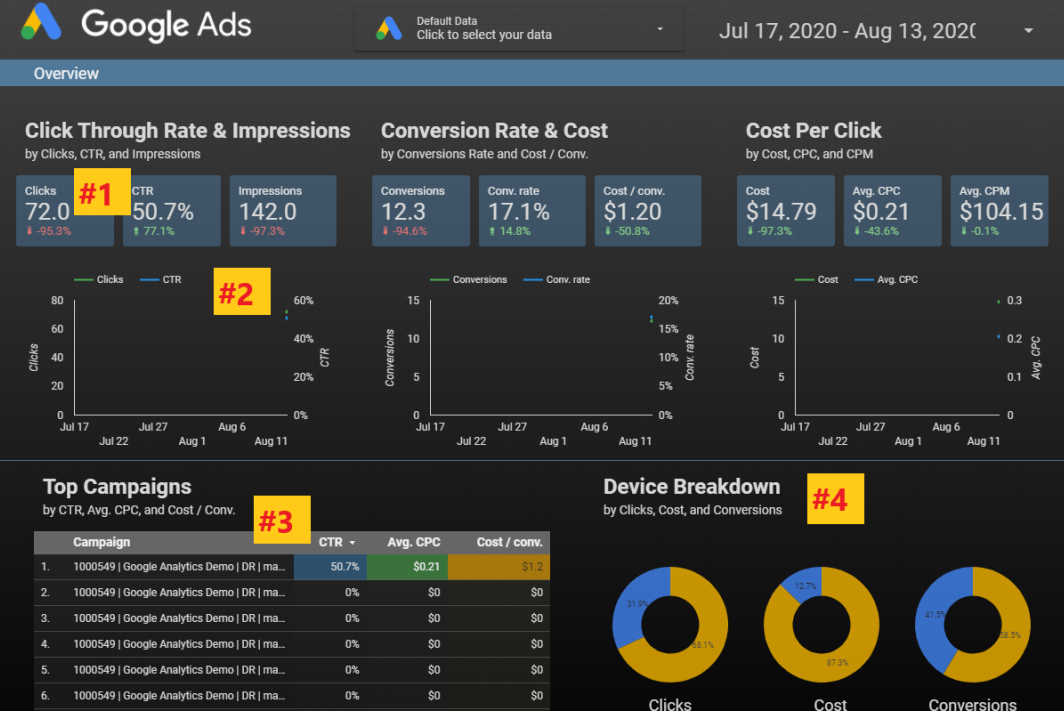
Let us consider four segments of a Google Ads template.

report in Google Data Studio
Source

The first one is the Scorecard section. It shows a single metric taken from a data source. Depending on the source, you can choose multiple options like CTR, clicks, and impressions. It will also show the comparison changes.

The next is the time series. It will show you the change in clicks and CTR over a pre-set period of time.

The third segment is the table which allows you in drilling down the campaigns, ad groups, and customizes the metrics.

The fourth one is the Pie Chart. This is another tool to showcase comparisons between different data points like clicks, conversions, costs, and more.

All these features can help you in customizing the look of the report.

How to edit data formats?

This is how you change the look and feel of the report. For editing the format and style of visualization, you have to select a scorecard.

On your right, you will find the Google Data Studio editing panel. You can change fonts, background colors, change the comparison, and metric colors, text padding to align it left, right, or center.

If you want to select all the scorecards at once, select all of them at the same time. This is how you apply the style changes to all of the selected scorecards.

How to add report filters?

The best way to group multiple visualizations is by adding reports and page filters. For instance, if you want to change the tables and charts while editing the data range, all you have to do is all a data range icon.

Thus, even if the report is compromised, whenever the data range is updated, all the chart data is updated along with it.

If you want to get into the Device Type performance, there is also a filter for that. Go to “insert” then click on “filter control” and add the dimension of the “device” as a filter.

Even if you want to review the data by network type of Search or Display or YouTube, there is also a filter for that. Choose the Advertising Channel Type as the dimension while adding the filter.

Then there is the dashboard that gives you an overview of the website traffic, conversions trending, user behavior trending, device-specific conversions, and traffic, and more. You can check the PPC campaign performances, and search term reports.

In conclusion, it can be said Google Data Studio is currently the best way for creating reports and analytics. This introduction will help you in creating a customized and detailed report for your clients.